
If you’re a fleet operator, you can access and use the WebApp to manage your vehicles and drivers.
1. Vehicle management
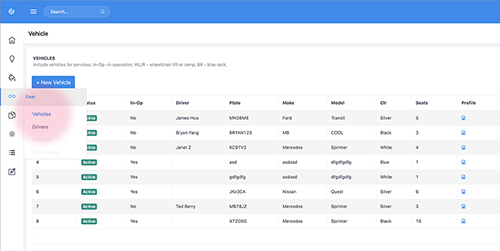
You can add, review and edit vehicles information including service status and assigned program here.
Click on the View icon to review the vehicle information. Or click on the Edit icon to change the vehicle information.
Note: If you suspend or dismiss a vehicle, this vehicle will not be placed on the Duet services anymore until you change its status to Active again.
To add a new vehicle, click on + New vehicle button, and then fill out the form. For the information that you don’t have, you can enter Not available or N/A.
2. Driver management
You can use this table to record and manage the drivers who are staffed for the Duet services.
Click on the View icon to review the driver profile. Or click on the Edit icon to change the information for this driver.
Note: If you suspend or dismiss a driver, this driver will not be placed on the Duet services anymore until you change his or her status to Active again.
To add a new driver, click on + New driver button, and then fill out the form. For the information that you don’t have, you can enter Not available or N/A.
Comments
0 comments
Please sign in to leave a comment.